Input & settings reference
Dirtbound Controls: Keyboard, Gamepad & Touch
Dirtbound controls support three input methods: default keyboard keys (WASD or arrow keys to drive, Space for handbrake, R to reset, C for camera, E or Enter for power-ups, and P or Esc to pause), an auto-detected gamepad, and touch controls where the car accelerates on its own while you slide a finger to steer. Every keyboard action can be rebound inside Settings under Controls, while Esc always opens pause.
DirtBound is played on its official site at dirtbound.fr, and this site is an unofficial fan guide that does not host the game. Return to the main guide below when you are ready to launch the game.
What are the default Dirtbound controls for keyboard, gamepad, and touch?
The table below maps every driving, recovery, camera, and menu action listed in DirtBound's November 2026 settings across all three supported input types.
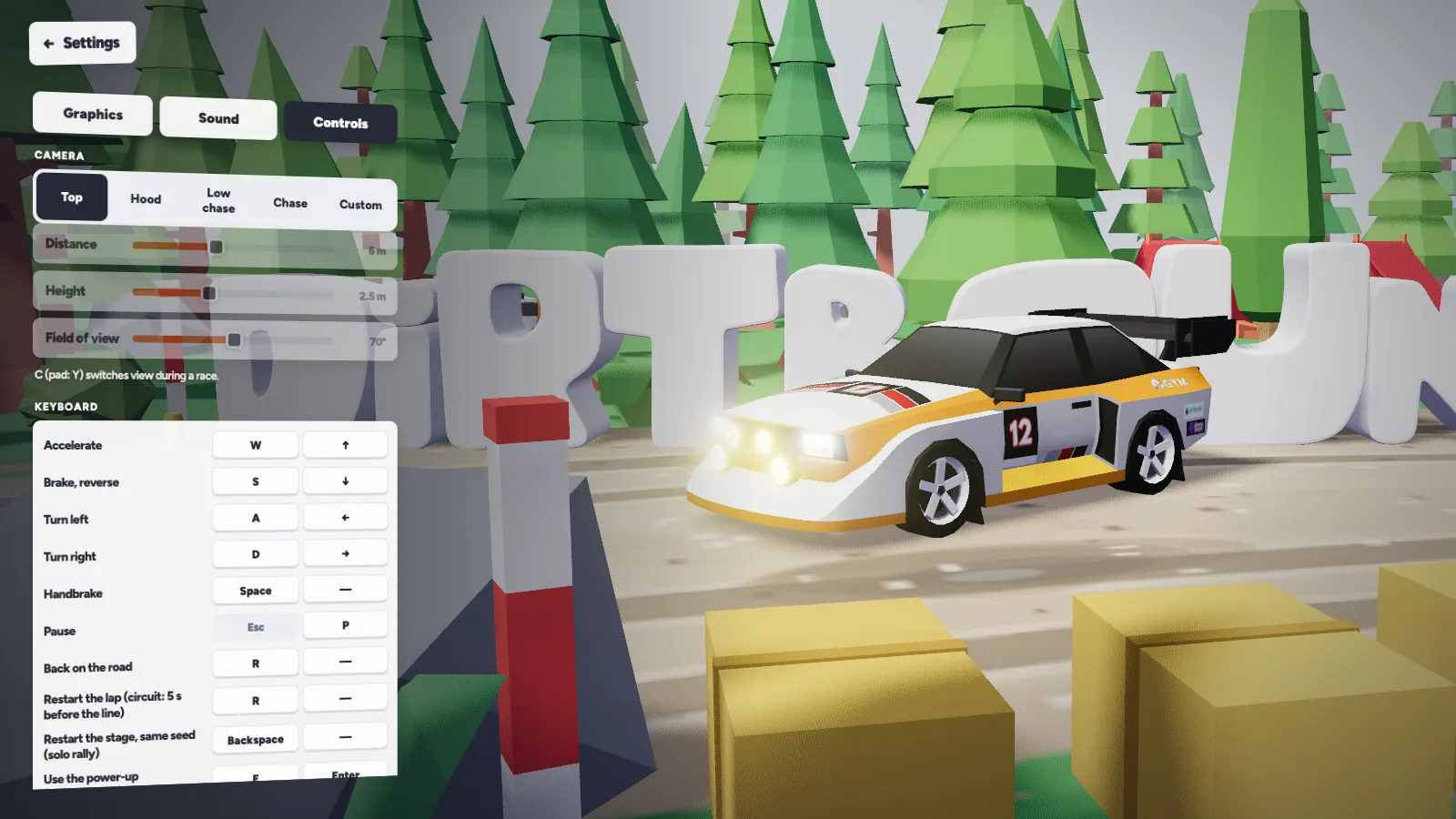
| Action | Keyboard default | Gamepad default | Touch screen |
|---|---|---|---|
| Accelerate | W or Up Arrow | Right trigger | Automatic (no gas button) |
| Brake / Reverse | S or Down Arrow | Left trigger | No separate brake pedal |
| Turn left | A or Left Arrow | Left stick or D-pad | Slide finger left |
| Turn right | D or Right Arrow | Left stick or D-pad | Slide finger right |
| Handbrake | Space | A | Not listed in touch hint |
| Stage reset / Circuit lap retry | R | Select | Not listed in touch hint |
| Change camera view | C | Y | Not listed in touch hint |
| Use power-up (Experimental) | E or Enter | B or RB | Not listed in touch hint |
| Pause menu | P or Esc | Start | Not listed in touch hint |
DirtBound detects a connected controller automatically using standard trigger and face-button mappings shown in the in-game settings screen.
How do Dirtbound controls split across driving, recovery, camera, and menus?
Instead of remembering ten keys as one flat list, it helps to separate the inputs you hold continuously while cornering from the keys you tap only between runs or inside menus.
Driving and slides
- Gas and braking stay paired on W/S or Up/Down on keyboard, and on the Right/Left triggers on a controller.
- Steering uses A/D or Left/Right on keyboard, or the left stick and D-pad on a gamepad.
- Space on keyboard and A on a gamepad trigger the handbrake when entering tight turns.
Mode-specific actions
- R puts the car back on the road during a generated stage, or restarts the lap on a closed circuit.
- E and Enter (or B and RB on a gamepad) fire a held Rocket, Lightning, or Turbo power-up in Experimental multiplayer only.
- In Solo or Classic multiplayer, the power-up keys have no item boxes to trigger.
Camera and pause menu
- C on keyboard or Y on gamepad cycles forward through Top, Hood, Low chase, Chase, and Custom camera views.
- P or Esc on keyboard and Start on gamepad open the pause menu, where you can toggle the ghost car, performance mode, or photo mode.
Circuit editor controls
- In the Circuit Editor, you click to place points so the road traces your layout until you close the loop.
- Editor tools also let you start from Oval, Bean, Kart, or Grand prix templates, sculpt terrain, paint forest, bank corners, raise the road on piers, set time of day, or import an SVG path.
How do you rebind keyboard keys in Dirtbound?
If you prefer a different layout for handbrake, reset, or camera switching, DirtBound lets you reassign keyboard keys right inside the Settings menu.
-
Open Settings and choose Controls
Navigate to the Settings screen and select the Controls section.
-
Click the binding you want to replace
Click the key you want to change, then press the new key.
-
Press the replacement key—or cancel or clear
Press your desired key to save the new binding. Press Escape if you want to cancel without changing anything, or press Backspace to clear the slot.
-
Keep the fixed pause rule in mind
Even if you customize other keys or assign a different pause key alongside P, the Esc key always pauses the game.
The game's settings text describes rebinding for keyboard keys; it does not document remapping gamepad buttons.
How do the R reset key, C camera switch, and touch screen work while driving?
The R key (or Select on a controller) behaves differently depending on whether you are driving a Solo Stage or a Circuit. On a generated point-to-point stage, R puts your car back on the road when you get stuck, which costs time—so the game advises saving it for when you are properly stuck rather than after every slide. On a timed circuit, pressing R sends your car back to 5 seconds before the start line, giving you a quick way to retry a lap you have already spoiled.
Pressing C on a keyboard or Y on a controller rotates through five camera views: Top, Hood, Low chase, Chase, and Custom. If none of the four preset angles fit your driving style, Custom lets you adjust camera distance, height, and field of view. Separate sliders in the game's settings also control engine, tyre, and music volume. Inside the pause menu, you can switch the circuit ghost between the online record, your own best, or off, toggle performance mode, or open photo mode with controls for aperture, focus, shutter speed, exposure, and colour grading.
On phones and tablets, DirtBound replaces keyboard keys and pedals with a single-finger gesture. As the in-game hint explains, you place your finger on the screen and slide toward the direction you want to go while the car accelerates by itself. Because we have not measured how well the game runs on different phones, a computer remains the safe choice; if a device struggles, switch to the Low graphics preset in Settings or turn on performance mode inside the pause menu.
Dirtbound controls FAQ
Can you rebind keys in Dirtbound?
Yes. Open Settings, go to Controls, click any key binding, and press a new key to replace it. Pressing Escape cancels the change, Backspace clears a binding, and Esc always pauses the game.
Does Dirtbound support a controller?
Yes. DirtBound detects a gamepad automatically: left stick or D-pad to steer, right trigger to accelerate, left trigger to brake and reverse, A for handbrake, B or RB for power-ups, Y to change view, Start to pause, and Select to reset.
Why does pressing R work differently in Stage and Circuit?
On a point-to-point stage, R recovers your car back onto the road with a time penalty. On a closed circuit, R rewinds you to 5 seconds before the start line so you can quickly restart a spoiled lap.
How do Dirtbound touch controls handle gas and braking?
There are no on-screen gas or brake pedals to hold. You put your finger down and slide toward the direction you want to go, and the car accelerates by itself.
What do E and Enter do in Dirtbound?
E and Enter activate held power-ups picked up from question-mark boxes in Experimental multiplayer. They are not used in Solo stages, Solo circuits, or Classic multiplayer.